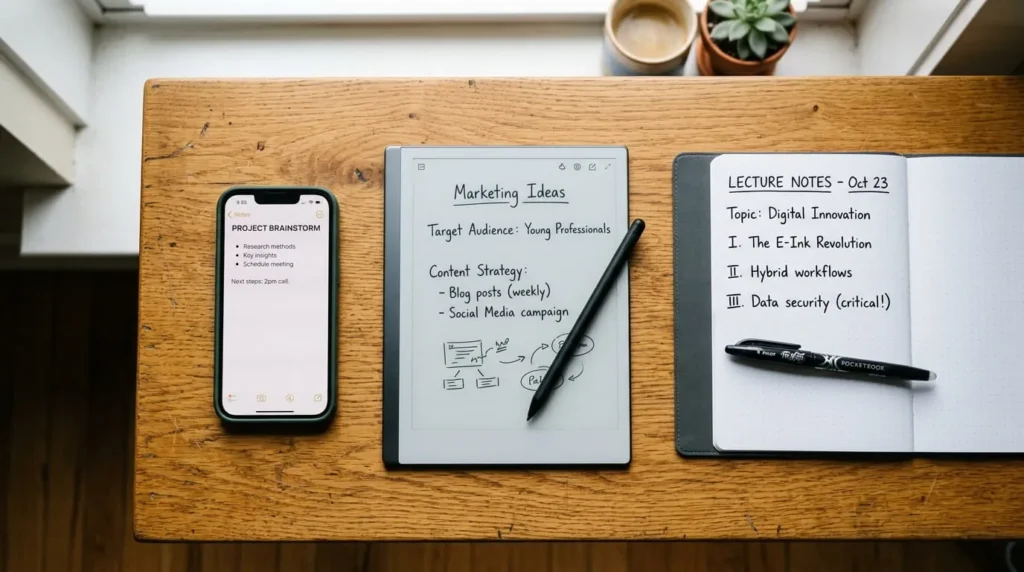

“Digital notebook” gets used for three completely different products, and that’s why shopping for one is confusing. It can mean a note-taking app on your phone, an e-ink tablet you write on with a stylus, or a reusable paper notebook that scans into your phone. Each solves a different problem, and the wrong pick means you’ll stop using it within a month. This guide walks through what separates them, which one matches how you actually take notes, and the features that matter more than the marketing copy suggests.
What Is a Digital Notebook, Exactly
A digital notebook is any tool that lets you capture notes and organize them into searchable, syncable pages instead of loose paper. That’s a broad definition on purpose, because the category spans software you already have installed, like OneNote or Evernote, and physical hardware built specifically to bridge pen and screen.
The common thread is what a digital notebook is not. It’s not a single note or a simple text field. It behaves like a real notebook, with separate sections or notebooks, pages that stay in order, and a way to flip back through old entries. The difference from paper is that everything inside it can be searched, backed up, and pulled up on a different device than the one you wrote it on.
The Three Ways to Go Digital With Your Notes
Note-Taking Apps (Type on Any Device)
This is the cheapest and most flexible route, and it’s where most people should start. Apps like OneNote, Evernote, and Zoho Notebook run on your phone, tablet, and computer, and every note syncs across all three automatically. You can type, paste in images, attach files, and record short audio clips alongside your text.
The trade-off is the writing experience itself. Typing on a phone keyboard is fine for a quick list, but it’s a poor substitute for a lecture or a brainstorming sketch. Most of these apps do support a stylus for freehand writing on a tablet screen, but the smoothness of that experience depends heavily on your specific device and app combination, and it’s worth testing before committing to one ecosystem.
E-Ink Tablets (Write With a Stylus, No Paper)
Devices like the reMarkable and Boox Note Air are dedicated e-ink tablets built to feel like paper under a pen. The screen has almost no glare, the stylus has real friction against the surface, and battery life is measured in weeks rather than hours because the display only draws power when the image changes.
These are the closest thing to writing on paper while staying fully digital. Handwriting-to-text conversion runs either on the device or through a companion app, so your scrawled notes become searchable without retyping anything. The catch is price. A capable e-ink tablet typically costs $250 to $450, and some models require a subscription for cloud sync or handwriting conversion, which turns a one-time purchase into an ongoing cost.
Reusable Paper Notebooks and Smart Pens (Write With Ink, Digitize Later)
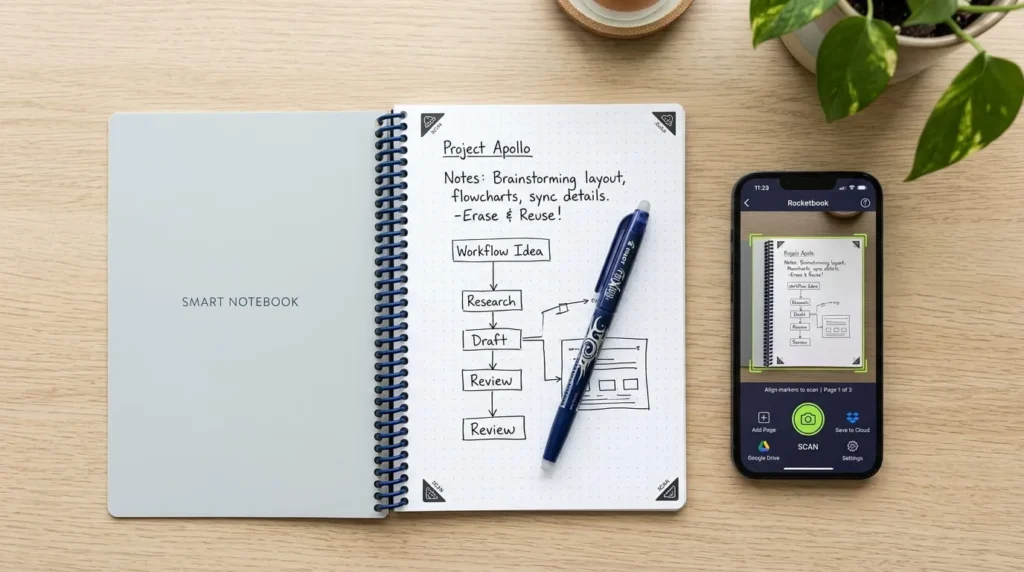
If you want the actual feel of pen on paper, this is the category for you. A reusable notebook like Rocketbook uses special pages and an erasable pen. You write normally, scan the page with your phone’s camera through the companion app, and the app uploads it to whichever service you’ve connected, whether that’s Google Drive, Notion, or email. Wipe the page with a damp cloth and it’s blank again.

A smart pen works differently. It’s a normal-feeling pen with a tiny camera near the tip that tracks your strokes on specially dotted paper, capturing everything in real time without a separate scanning step. The pen needs to be charged and paired with your phone, and you’re locked into buying that brand’s paper, but you never have to remember to scan anything afterward.
Both approaches share one real limitation. You can’t search or edit what you’ve written until it’s been through OCR (optical character recognition), and handwriting accuracy varies a lot depending on how neat your writing is.
How to Choose Based on the Way You Actually Take Notes
Don’t start with the product category. Start with what your notes look like when you’re actually making them.
If you mostly jot quick reminders, meeting action items, or short lists, a note-taking app on your phone covers that with zero friction, since you already carry the device. If you need to draw diagrams, mark up PDFs, or take dense freeform notes during long lectures or meetings, an e-ink tablet handles that better than typing ever will, and it won’t tempt you into checking notifications mid-thought the way a regular tablet does. If the physical act of writing with real ink matters to you, or you want to keep using notebooks you already own, a smart pen or reusable notebook gets you the digital backup without changing how you write.
It’s also common to use more than one. Plenty of people keep a reusable notebook for meetings and a note-taking app for quick capture on the go, and that combination is usually cheaper and more practical than trying to force one device to do everything.
Features Worth Checking Before You Buy or Download
1: Handwriting Recognition and Search
If any part of your workflow involves handwriting, test the OCR before you commit. Accuracy drops fast with messy handwriting, cursive, or non-English characters, and a notebook you can’t search is barely better than paper. Look for a free trial or a return window so you can test it with your actual handwriting, not a demo written by someone with neat print.
2: Where Your Notes Actually Live
Check whether the app stores notes in a proprietary format that’s hard to export, or in open formats like PDF and plain text that you can pull out anytime. This matters more than it seems, because switching note-taking systems later is painful if your five years of notes are trapped in a format only one app can open.
3: Subscription Costs You Might Not Notice
Basic note-taking and storage are usually free across every major app and device in this category. The paid tier almost always gates specific things: unlimited OCR scans, AI-generated summaries, handwriting-to-text conversion beyond a monthly cap, or extra cloud storage. Read exactly what triggers the paywall before you build a habit around a feature that stops working once you hit a limit.
Digital Notebook Setups for Common Situations
1: Students
A note-taking app handles reading assignments and to-do lists well, but an e-ink tablet or a reusable notebook is usually the better fit for lecture notes, since most students write faster by hand than they type accurately, and diagrams and equations are far easier to sketch than type.
2: Meetings and Work Notes
A note-taking app with audio recording tied to the transcript is the strongest option here, since it lets you keep typed notes while capturing exactly what was said if you need to go back and check a decision. If your workplace still runs on printed agendas or handouts, a smart pen lets you annotate directly on paper while still ending up with a searchable digital copy.
3: Journaling and Personal Use
A reusable notebook or a basic note-taking app both work well for journaling, and the choice usually comes down to whether you want the tactile habit of physical writing or the convenience of typing from bed on your phone.
Common Mistakes When Switching to a Digital Notebook
The most common mistake is buying hardware before testing the handwriting recognition, then discovering the OCR mangles your handwriting badly enough that you stop trusting the search function. The second is picking a device that locks your notes into one ecosystem, so switching later means manually re-exporting years of pages. The third is underestimating battery habits. A smart pen or e-ink tablet that’s dead when you need it is worse than the paper notebook it replaced, so build charging into your routine the same way you would for your phone.